Account & Privacy¶
This page bundles everything about your account: password and security, two-factor login, parental consent, data export and account deletion.
All functions live under techlogia.de/lab/account/settings.
Change password¶
In the account area under "Security" you can change your password anytime. You need:
- Your current password
- A new password (at least 8 characters, with letters and digits)
- To repeat the new password
After a successful change you are not auto-logged-out on other devices – sign out there separately if the device is unsafe.
Forgot password?¶
If you no longer know your password:
- Go to techlogia.de/lab/auth/forgot-password.
- Enter your email address.
- You receive an email with a reset link.
- The link leads to a page where you set a new password.
The reset link is valid for 30 minutes. After that, restart the flow.
Two-Factor Authentication¶
With two-factor authentication (MFA) you protect your account additionally. We recommend MFA especially if you create content or hold a teacher role.
Activate¶
- Under "Security" → Activate two-factor login
- The Lab shows a QR code
- Scan it with an authenticator app (Google Authenticator, Authy, 1Password, …)
- Enter the 6-digit code from the app to confirm
Backup codes¶
Right after activation you get one-time codes (backup codes). Print them or store them safely. If you lose your phone, you can log in with any of them – each code works only once.
Deactivate¶
You can disable MFA anytime. A fresh confirmation code from the app is required.
Parental consent¶
For learners under 16, GDPR Art. 8 requires consent of the legal guardian.
When creating the account¶
- Birth year is asked on registration
- For
age < 16: additional guardian email - Guardians get a confirmation email with a link
Check status¶
In the account area under "Consents" you see:
- Account confirmed – you used your own confirmation link
- Parental consent granted – if required
Without parental consent you can not start sessions, but you can log in and view content.
Correct guardian address¶
If the guardian email was entered wrong, contact info@techlogia.de. The address can be corrected manually and the consent link resent.
Turned 16?¶
When you turn 16, no action needed. Consent remains valid. If you want to start fresh, delete the account and re-register.
Terms status¶
Under "Legal" you see:
- Which terms version you currently accepted
- The timestamp of acceptance
- The full text of the current version
When Techlogia changes the terms, a dialog appears on next login with the new text. You can read the new terms before agreeing.
Data export (GDPR Art. 15)¶
You have the right to a complete export of your data at any time.
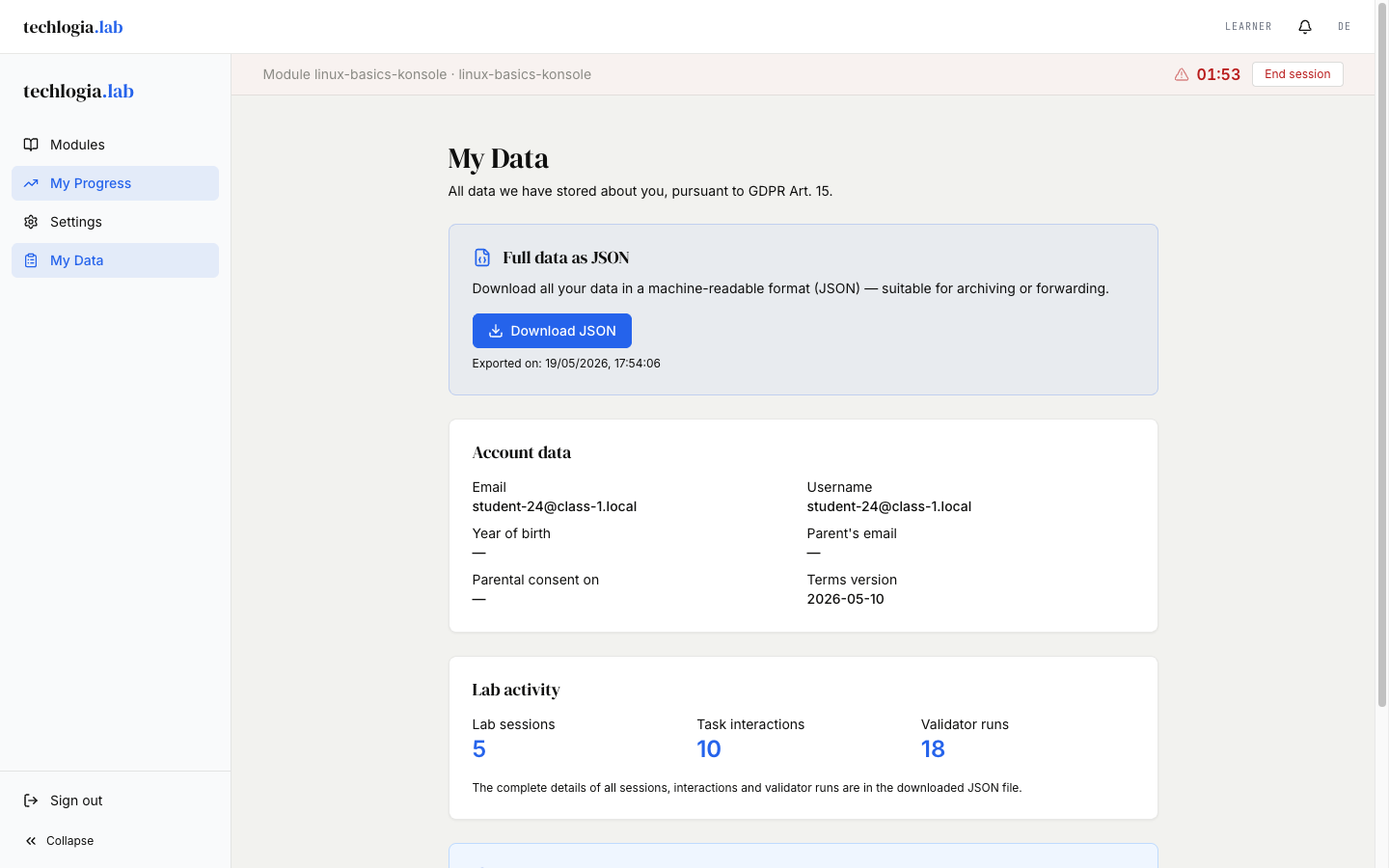
- Account → "Data export"
- Click Start export
- You'll get a JSON file with:
- Account data (email, name, birth year, roles)
- All sessions (which modules, started when, duration)
- All task statuses
- All validations (audit log)
- Accepted terms versions
- Parental consent status (if any)
The file is machine-readable and can be imported into other systems.
Timestamps in the file (fields whose name ends in _at) without a time zone are in UTC (Coordinated Universal Time) – for German time add 1 hour (winter time) or 2 hours (summer time); the preview on the "My Data" page already shows German time.
Wait time for large exports
Very active accounts may take a few seconds. The download starts automatically once the file is ready.
Delete account (GDPR Art. 17)¶
You can delete your account and all associated data yourself.
What happens?¶
- Your account is irrevocably deleted
- All active sessions end immediately, all VMs are deleted
- All task statuses and validation logs are deleted
- Anonymized platform statistics (e.g. "10,000 sessions this month") remain – without personal reference
What remains due to legal obligations?¶
Certain data we must retain temporarily:
- Billing-relevant logs (max. 10 years, § 257 HGB) – only school accounts affected
- Security logs (90 days)
These contain no learning content and no VM contents – only metadata like login timestamps and hashed IPs.
How to delete¶
- Account → "Delete account"
- Enter your current password again
- Confirm with "I understand this action is irrevocable"
- Click Delete account permanently
Confirmation¶
You receive a deletion confirmation email. Right after clicking you are logged out and the account is inaccessible.
Class students
If you have a class-student account (class-code login), you can delete it yourself. Your teacher is notified that you left the class.
Change email address¶
To move to a new email address:
- Account → "Profile" → Change email
- New address + current password
- A confirmation email is sent to the new address
- Only after clicking the link is the address active
Until then the old address remains active – you don't lock yourself out if the new address was wrong.
Manage notifications¶
Under "Notifications" you control what reaches you by email:
- Homework – new homework, deadline approaching
- Security – login from a new device, password changed
- System – terms changes, maintenance windows
Security emails (e.g. password reset) cannot be disabled for legal reasons.
FAQ¶
"I activated MFA and lost my phone"¶
Use one of your backup codes on login. If you also lost the codes, contact info@techlogia.de – we verify you via account data and can reset MFA.
"I just want to pause briefly"¶
There is no "pause" function directly. Options:
- Just don't use the account – data remains
- Disable notifications so no emails arrive
- For long pauses: delete the account, register again later
"Will my parents be informed about my progress?"¶
No. Parents only receive the one-time consent email. Your learning content and progress are not shared.
"What happens to data from my deleted VMs?"¶
VMs are deleted within minutes after session end. There is no backup of VM contents, neither by you nor by Techlogia.
Privacy – more information¶
- Privacy notice of techlogia.de – platform-wide
- Lab-specific privacy notice – details on Lab, VMs, parental consent
- Imprint
For privacy requests beyond self-service, contact info@techlogia.de.